
Note
Click here to download the full example code
Datasets
How to list and download datasets.
import openml
import pandas as pd
Exercise 0
List datasets * Use the output_format parameter to select output type * Default gives ‘dict’ (other option: ‘dataframe’)
openml_list = openml.datasets.list_datasets()  # returns a dict

# Show a nice table with some key data properties
datalist = pd.DataFrame.from_dict(openml_list, orient='index')
datalist = datalist[[
    'did', 'name', 'NumberOfInstances',
    'NumberOfFeatures', 'NumberOfClasses'
]]

print("First 10 of %s datasets..." % len(datalist))
datalist.head(n=10)

# The same can be done with lesser lines of code
openml_df = openml.datasets.list_datasets(output_format='dataframe')
openml_df.head(n=10)
Out:
First 10 of 2838 datasets...
Exercise 1
Find datasets with more than 10000 examples.
Find a dataset called ‘eeg_eye_state’.
Find all datasets with more than 50 classes.
datalist[datalist.NumberOfInstances > 10000
         ].sort_values(['NumberOfInstances']).head(n=20)
datalist.query('name == "eeg-eye-state"')
datalist.query('NumberOfClasses > 50')
Download datasets
# This is done based on the dataset ID.
dataset = openml.datasets.get_dataset(1471)

# Print a summary
print("This is dataset '%s', the target feature is '%s'" %
      (dataset.name, dataset.default_target_attribute))
print("URL: %s" % dataset.url)
print(dataset.description[:500])
Out:
This is dataset 'eeg-eye-state', the target feature is 'Class'
URL: https://www.openml.org/data/v1/download/1587924/eeg-eye-state.arff
**Author**: Oliver Roesler
**Source**: [UCI](https://archive.ics.uci.edu/ml/datasets/EEG+Eye+State), Baden-Wuerttemberg, Cooperative State University (DHBW), Stuttgart, Germany
**Please cite**: [UCI](https://archive.ics.uci.edu/ml/citation_policy.html)

All data is from one continuous EEG measurement with the Emotiv EEG Neuroheadset. The duration of the measurement was 117 seconds. The eye state was detected via a camera during the EEG measurement and added later manually to the file after
Get the actual data.
The dataset can be returned in 2 possible formats: as a NumPy array, a SciPy
sparse matrix, or as a Pandas DataFrame (or SparseDataFrame). The format is
controlled with the parameter dataset_format which can be either ‘array’
(default) or ‘dataframe’. Let’s first build our dataset from a NumPy array
and manually create a dataframe.
X, y, categorical_indicator, attribute_names = dataset.get_data(
    dataset_format='array',
    target=dataset.default_target_attribute
)
eeg = pd.DataFrame(X, columns=attribute_names)
eeg['class'] = y
print(eeg[:10])
Out:
            V1           V2           V3  ...          V13          V14  class
0  4329.229980  4009.229980  4289.229980  ...  4635.899902  4393.850098      0
1  4324.620117  4004.620117  4293.850098  ...  4632.819824  4384.100098      0
2  4327.689941  4006.669922  4295.379883  ...  4628.720215  4389.229980      0
3  4328.720215  4011.790039  4296.410156  ...  4632.310059  4396.410156      0
4  4326.149902  4011.790039  4292.310059  ...  4632.819824  4398.459961      0
5  4321.029785  4004.620117  4284.100098  ...  4628.209961  4389.740234      0
6  4319.490234  4001.030029  4280.509766  ...  4625.129883  4378.459961      0
7  4325.640137  4006.669922  4278.459961  ...  4622.049805  4380.509766      0
8  4326.149902  4010.770020  4276.410156  ...  4627.180176  4389.740234      0
9  4326.149902  4011.280029  4276.919922  ...  4637.439941  4393.330078      0

[10 rows x 15 columns]
Instead of manually creating the dataframe, you can already request a dataframe with the correct dtypes.
X, y, categorical_indicator, attribute_names = dataset.get_data(
    target=dataset.default_target_attribute,
    dataset_format='dataframe'
)
print(X.head())
print(X.info())
Out:
        V1       V2       V3       V4  ...      V11      V12      V13      V14
0  4329.23  4009.23  4289.23  4148.21  ...  4211.28  4280.51  4635.90  4393.85
1  4324.62  4004.62  4293.85  4148.72  ...  4207.69  4279.49  4632.82  4384.10
2  4327.69  4006.67  4295.38  4156.41  ...  4206.67  4282.05  4628.72  4389.23
3  4328.72  4011.79  4296.41  4155.90  ...  4210.77  4287.69  4632.31  4396.41
4  4326.15  4011.79  4292.31  4151.28  ...  4212.82  4288.21  4632.82  4398.46

[5 rows x 14 columns]
<class 'pandas.core.frame.DataFrame'>
RangeIndex: 14980 entries, 0 to 14979
Data columns (total 14 columns):
V1     14980 non-null float64
V2     14980 non-null float64
V3     14980 non-null float64
V4     14980 non-null float64
V5     14980 non-null float64
V6     14980 non-null float64
V7     14980 non-null float64
V8     14980 non-null float64
V9     14980 non-null float64
V10    14980 non-null float64
V11    14980 non-null float64
V12    14980 non-null float64
V13    14980 non-null float64
V14    14980 non-null float64
dtypes: float64(14)
memory usage: 1.6 MB
None
Sometimes you only need access to a dataset’s metadata. In those cases, you can download the dataset without downloading the data file. The dataset object can be used as normal. Whenever you use any functionality that requires the data, such as get_data, the data will be downloaded.
dataset = openml.datasets.get_dataset(1471, download_data=False)
Exercise 2
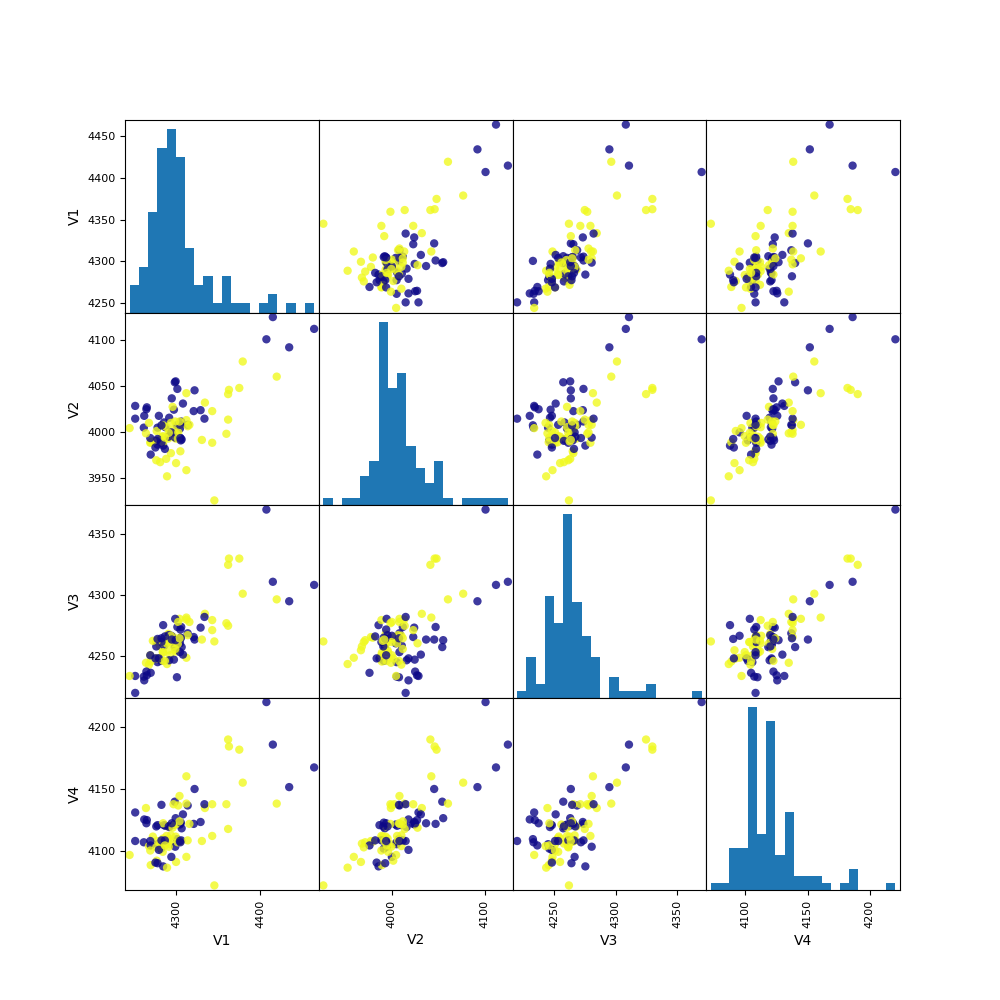
Explore the data visually.
eegs = eeg.sample(n=1000)
_ = pd.plotting.scatter_matrix(
    eegs.iloc[:100, :4],
    c=eegs[:100]['class'],
    figsize=(10, 10),
    marker='o',
    hist_kwds={'bins': 20},
    alpha=.8,
    cmap='plasma'
)
Total running time of the script: ( 0 minutes 4.647 seconds)